![Fabicaon.png]](https://44059364.hs-sites.com/hs-fs/hubfs/Fabicaon.png?width=40&height=40&name=Fabicaon.png)
Catalog stores don't work like group stores. Instead of one launch and close date, orders come in continuously and get pulled together into batches for production. That's made it hard to give customers a heads-up that their order has moved from "placed" to "in process," since there's no single moment to send that update from.
A new Catalog Batch Created trigger fixes that. Set it up once, and Chipply sends the message automatically every time a batch is created, to everyone whose order is in that batch.
Setting It Up
- In your catalog store, go to Communication > Messages and click +.
- Choose Default Automated – Store as the message type.
- Set the Trigger to Catalog Batch Created.
- Under recipients, choose All Order Recipients. This is what makes the message hands-off: instead of manually selecting who's in a given batch, Chipply automatically includes everyone with an order in it.
- Write your message. Something simple works well here, for example: "Your order is in process."
- Click Accept to save. If you're setting this up in more than one catalog store, turn on Add More first to keep the drawer open and create the next one without starting over.
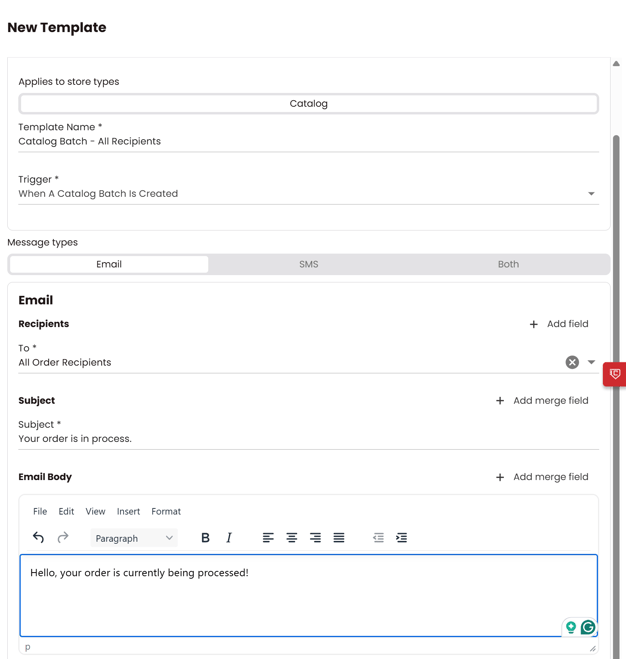
If you want every catalog store to send this automatically without setting it up store by store, create it instead as a template under Dealer Settings > Message Templates, with Applies to Store Types set to Catalog.
How It Works
When a batch is created for a catalog store, Chipply looks at every order recipient tied to that batch and sends them the message you set up, automatically. There's nothing to trigger by hand and nothing to remember to send after each batch runs.