![Fabicaon.png]](https://44059364.hs-sites.com/hs-fs/hubfs/Fabicaon.png?width=40&height=40&name=Fabicaon.png)
Updated Size Chart Display on Product Pages
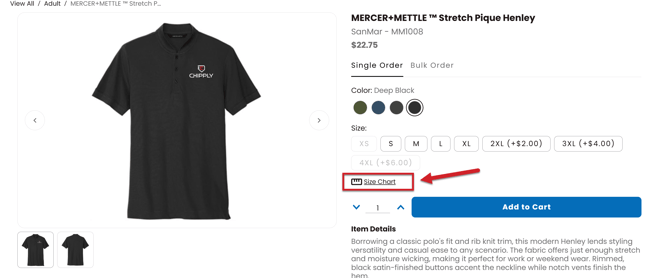
Size charts now appear as a clear, dedicated Size Chart icon on product details pages. When clicked, customers are taken directly to the size chart in a new view, making sizing information easier to find and reference, especially on mobile devices.
This updated display improves visibility without adding clutter to the product page, helping customers quickly access the information they need to choose the right size.
More Clearly Defined Size Chart Options in Product Setup
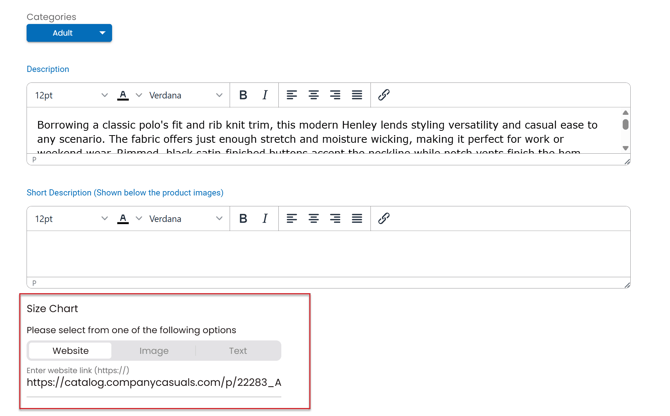
When building a product, size chart options are now more clearly defined. While the same functionality exists as before, the options are now more specific, making it easier to choose how sizing information is presented.
You can select whether your size chart links to a website, displays an image, or uses text, creating a clearer and more intuitive setup experience when managing product details.
View Notes and Transactions Within an Order
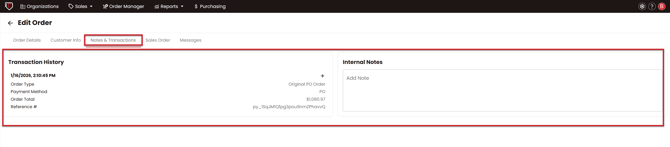
While you can still view Notes and Transactions by hovering over an order in Order Manager. You can now view the same information inside the order itself, making it easier to reference transaction history and add internal notes while working through an order.
This gives you faster access to important order details and helps keep context in one place without changing your existing workflow.