![Fabicaon.png]](https://44059364.hs-sites.com/hs-fs/hubfs/Fabicaon.png?width=40&height=40&name=Fabicaon.png)
New Feature: Dealer Inventory
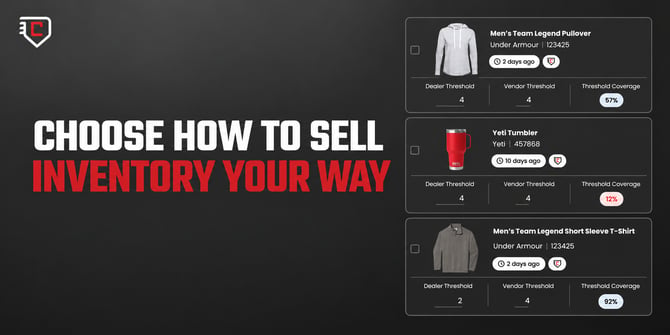
You've been asking for this, and it's finally here: track and sell from your own on-hand stock, not just what your vendors have available.
What you can do:
- Sell what's actually on your shelves. Bring in vendor products or custom items you've already decorated, and offer them right alongside everything else in your store.
- Set pricing and stock levels your way. Set your own cost, MSRP, and inventory threshold for every product, so you never sell something you don't actually have.
- Choose your stock first. Turn it on for a product and your store sells from your own inventory first, then shifts to vendor stock automatically if you run low.
One place for your inventory and your vendors'. Less overselling, more control, always know what's on hand.
Promotions: E-Certificates & Promo Codes
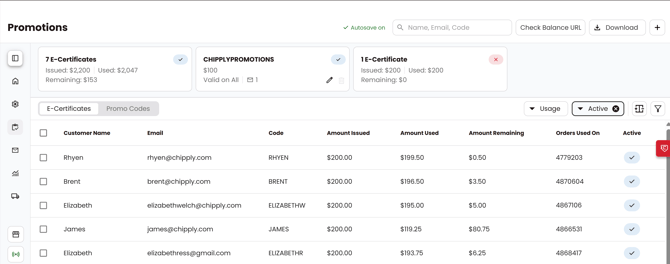
E-Certificates and Promo Codes are now combined into a single Promotions page with an updated look that matches the rest of the platform. You'll find both under Promotions on the left-hand menu within your stores, split into two tabs, with a summary of your totals right at the top.
What's New:
- Editing an e-certificate or promo code now opens in a drawer instead of a new page.
- Promo Codes can now be exported the same way E-Certificates always could, so you can see exactly which orders a promo code was used on.
- Filter either list by active status or by usage (Full Use, Partial Use, Never Used) to quickly see what still needs attention.
- See your e-certificate and promo code totals at a glance from the summary up top.
A New Look for Messaging
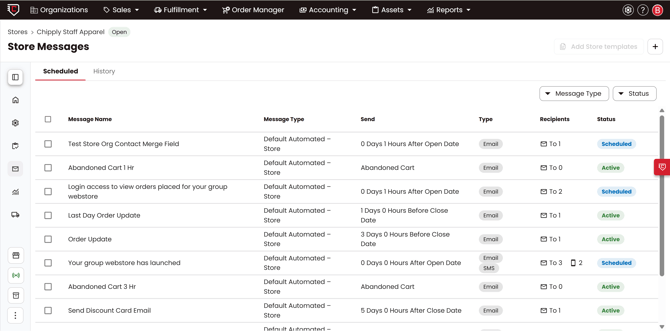
Messaging has a new look and some quality-of-life improvements to match the rest of the platform. The functionality you rely on today hasn't gone away, it's just organized differently and easier to get to.
What's New:
- Automated, New Message, and History are now combined into a single Messages page under Communication on the left-hand menu of your stores.
- Message templates have moved to Dealer Settings, so they work across your whole dealer account.
- Queue up a message for every order recipient automatically with the new All Order Recipients option, instead of selecting them each time.
- Resend any sent message, not just automated ones, straight from your message history.
Pickup Address Now Included on Order Confirmation Emails
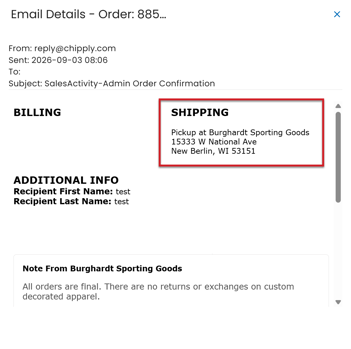
When you set your store up for In-Store Pickup, and a customer places an order on that store, your full address now shows on the order confirmation email, the same address that already shows up on packing slips and sales orders. Customers get clear directions on where to go, right when they need it.
This applies to In-Store Pickup orders only. For orders distributed to an organization (a team practice, a distribution day, etc.), the address isn't included, since Chipply doesn't always know exactly where an organization hands out its orders.