![Fabicaon.png]](https://44059364.hs-sites.com/hs-fs/hubfs/Fabicaon.png?width=40&height=40&name=Fabicaon.png)
What Is a Promo Code?
A promo code gives shoppers a discount at checkout. For example, you might create the code SPRING50 to take 50% off an order. You can limit a code to one use per email address, or leave it unlimited until you turn it off. Promo codes are a simple way to drive traffic, boost sales, and promote limited-time offers.
When Should I Use Promo Codes?
Promo codes work well any time you want to create urgency, increase sales, or encourage larger orders. Common uses include flash sales, seasonal promotions, and limited-time discounts designed to drive traffic and conversions.
How to Create a Promo Code
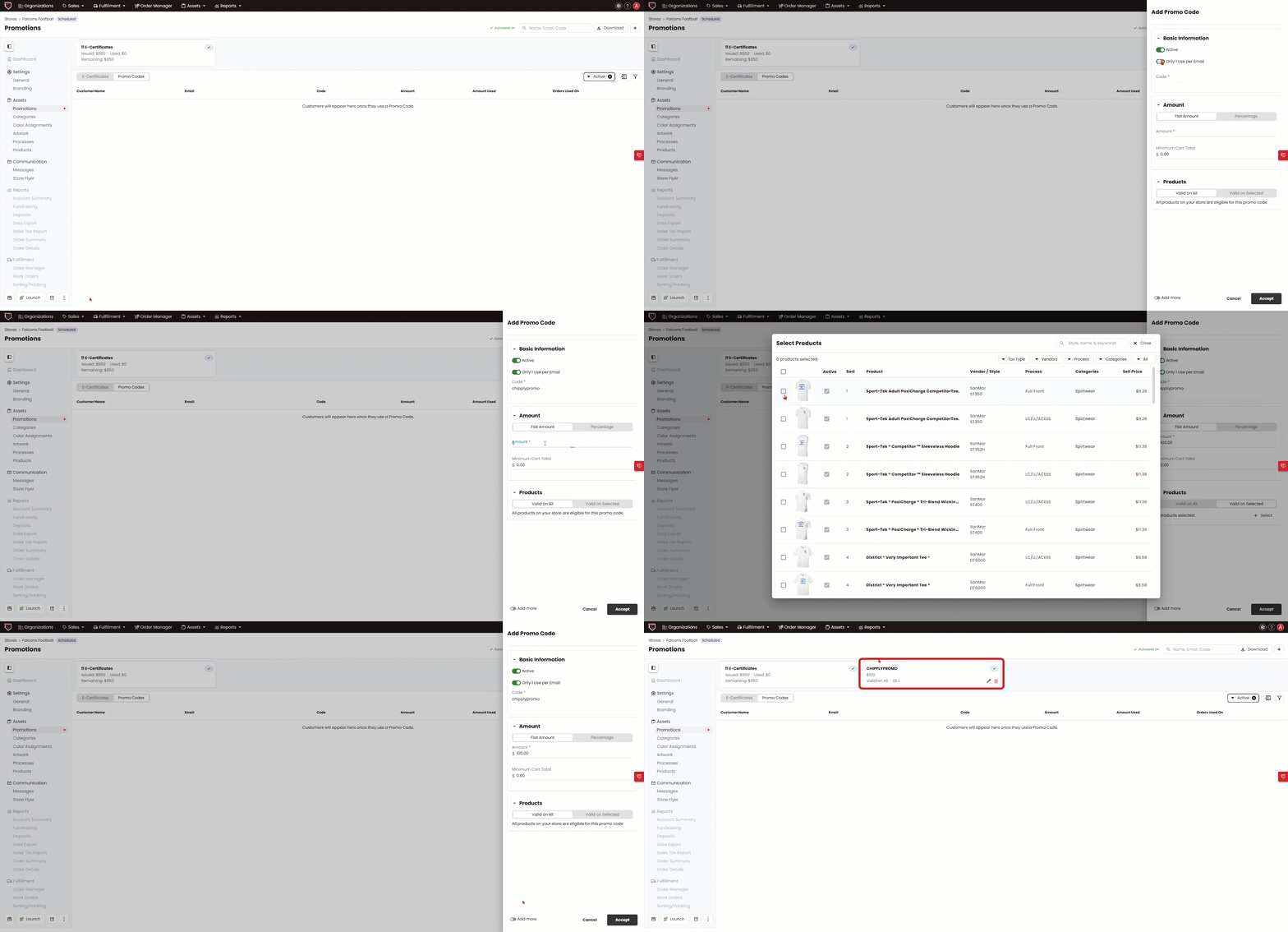
- In your store, go to Promotions on the left-hand menu.
- Click the + button in the top right corner of the screen and click Promo Code.
- Make sure Active is turned on.
- Check Only One Use Per Email Address if you want to limit how many times a single shopper can use the code.
- Enter a Code Name. It can include letters and numbers, and it is case-sensitive.
- Choose a discount type: a flat dollar amount or a percentage.
- If you choose a percentage, decide whether it applies to the cart total (only the products in the shopper's cart) or the order total (the full order amount).
- Enter a Minimum Cart Total. This is the amount a shopper must spend before the promo code can be applied.
- Enter a Max Value of Discount. This sets the most a shopper can save with the code, no matter how large their cart is. For example, a 25% code with a $20 max will never give more than $20 off, even on a $200 order.
- Choose whether the code is valid on all products or only valid on selected products. If you choose selected products, click Select to open the product picker, choose the products you want the code to apply to, and click Select again in the top right corner to confirm. Only the products you choose will work with the code.