![Fabicaon.png]](https://44059364.hs-sites.com/hs-fs/hubfs/Fabicaon.png?width=40&height=40&name=Fabicaon.png)
The Promotions page has a built-in export, so you can see every order that used a promo code without digging through orders one by one.
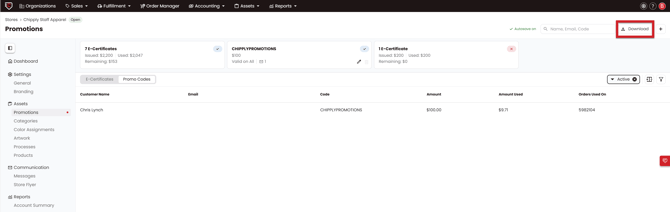
- In your store, go to Promotions in the left-hand menu.
- Click the Promo Codes tab.
- Click Export in the top right corner.
Chipply downloads an Excel spreadsheet listing every order a promo code was used on, including the promo code, type, promo amount, order number, customer email, order date, store name, and sales order.