![Fabicaon.png]](https://44059364.hs-sites.com/hs-fs/hubfs/Fabicaon.png?width=40&height=40&name=Fabicaon.png)
E-Certificates and Promo Codes are now combined into a single Promotions page with an updated look that matches the rest of the platform.
What's Changed at a Glance
- E-Certificates and Promo Codes are no longer separate pages in the left-hand menu. Both now live under Promotions, split into two tabs.
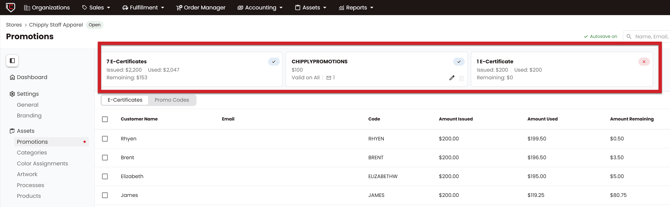
- A summary at the top of the page shows your e-certificate and promo code totals at a glance.
- Editing an e-certificate or promo code now opens in a drawer.
- Promo codes can now be exported, the same way e-certificates already could. So you can now easily see what orders a promo code was used on.
Finding Promotions in Your Store
In your store, go to Promotions on the left-hand menu.
At the top of the page, you'll see a summary of what's active on your store: how many e-certificates have been created, how many have been fully used, and how many haven't been used yet, along with how many promo codes are on your store. Below that summary, switch between the E-Certificates tab and the Promo Codes tab to see the full list for each.
Creating an E-Certificate or Promo Code
Click the + button in the top right corner. You can create an e-certificate or a promo code from whichever tab you're currently on.
Learn How to Create a Promo Code
Learn How to Create an E-certificate
Filtering and Viewing Usage
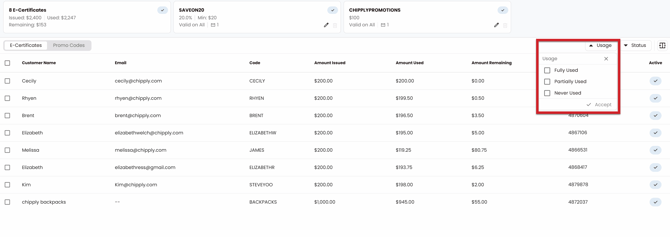
Both tabs let you filter your list by Active or Inactive status, and by usage: Fully Used, Partially Used, or Never Used. This makes it easy to see, for example, which promo codes nobody has used yet.
Exporting
Both tabs support downloading a spreadsheet of activity:
- E-Certificates export includes the customer name, email, code, amount issued, amount used, amount remaining, and the order it was used on, the same information as before.
- Promo Codes export is new. It lists every order a promo code was used on: the promo code, type, promo amount, order number, customer email, order date, store name, and sales order. Because it's a flat table with one row per order, the same promo code will appear on more than one row if multiple shoppers used it.