![Fabicaon.png]](https://44059364.hs-sites.com/hs-fs/hubfs/Fabicaon.png?width=40&height=40&name=Fabicaon.png)
You can now set a default warehouse at the account level, giving you greater control over where your items are sourced from.
How to Set This Up:
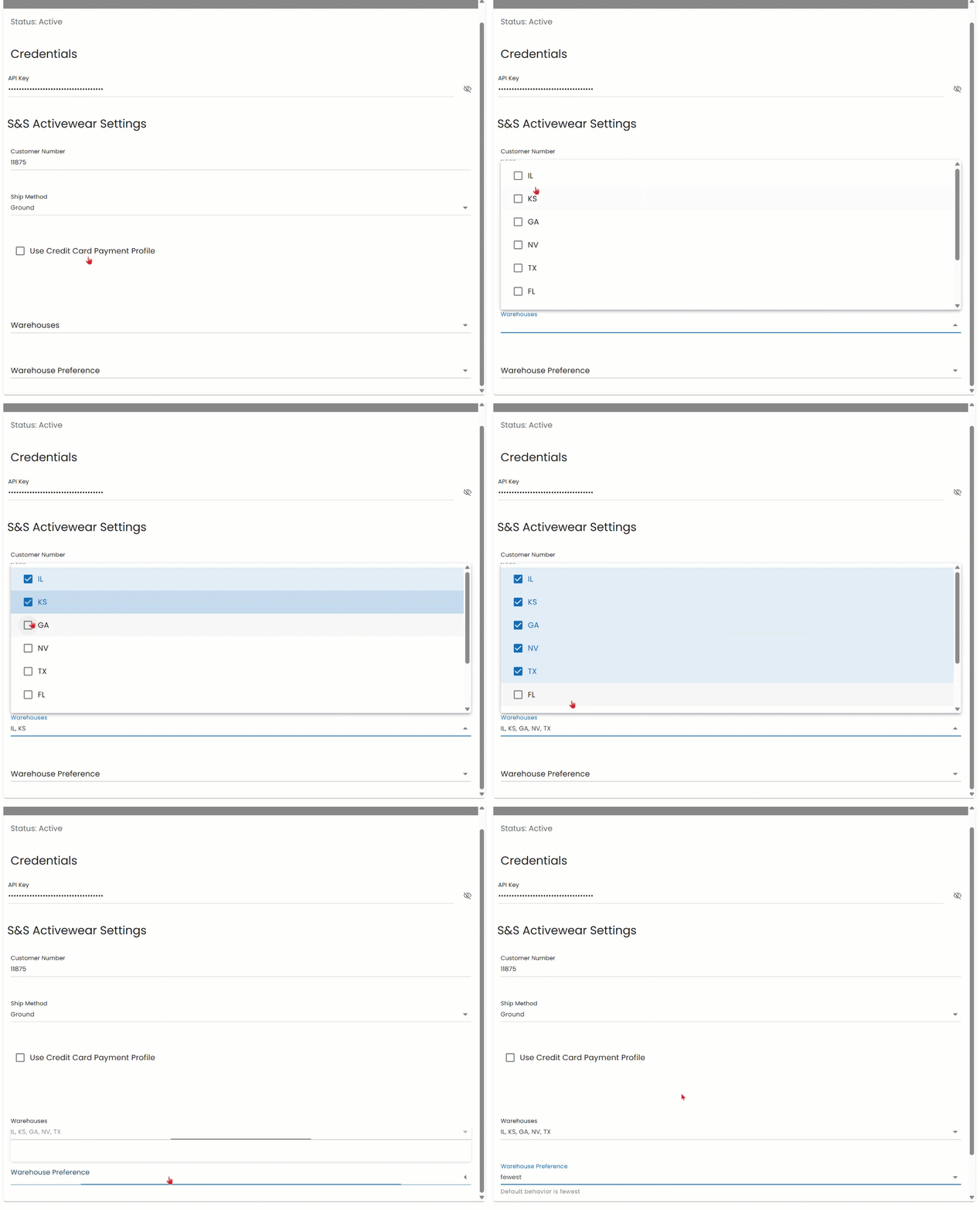
- Within your account, click the Settings Gear in the top right corner, then select Dealer Settings and navigate to Integrations.
- Under Integrated Systems, find and click on S&S Activewear to open your integration settings.
- Under Warehouses, select all the warehouses you would like your products to ship from.
- Under Warehouse Preferences, choose your preferred fulfillment method:
- Fewest consolidates your orders to ship from the fewest warehouses possible.
- Fastest ships each item from whichever warehouse can get it to you the quickest.
Note: If you do not select a warehouse, S&S Activewear will automatically choose the best warehouse to ship your products.