![Fabicaon.png]](https://44059364.hs-sites.com/hs-fs/hubfs/Fabicaon.png?width=40&height=40&name=Fabicaon.png)
💳 Payment Options Overview
Stripe Link
Stripe Link is a secure, fast-checkout option powered by Stripe — the same trusted payment processor that handles card and bank transactions on our platform. It allows customers to save their payment details for future purchases across any site that uses Stripe, making checkout faster and easier.
When choosing the “Bank” option through Stripe Link, customers may see a message such as “Get $5 back when you pay by bank.”
👉 Please note: This offer is a Stripe Link promotion, not a discount or credit from Chipply or your company.
The $5 does not come off your Chipply order total. If eligible, Stripe may issue the $5 back as a credit or rebate after the payment clears.
You can read the full promotion details and eligibility requirements here:
🔗 Stripe Link Promotion Terms
Key Points for Customers:
-
Stripe Link is offered and managed entirely by Stripe.
-
The “$5 back” promotion is Stripe’s own incentive, separate from your customer's order.
-
For questions about the $5 credit, please refer to Stripe’s terms linked above.
Google Pay
Google Pay allows customers to quickly and securely check out using saved payment information from their Google account. It works on Android devices and in Chrome browsers, letting users pay without having to manually enter their card details each time.
Key Benefits:
-
Fast, one-tap checkout for Android and Chrome users
-
Securely stores and encrypts payment information
Apple Pay
Apple Pay provides a similar streamlined experience for customers using iPhone, iPad, or Mac. Payments are authenticated using Face ID, Touch ID, or a secure passcode — and card details are never shared with merchants.
Key Benefits:
-
Fast and private checkout for Apple device users
-
Payments are processed instantly through Apple’s secure system
Klarna
Klarna allows customers to split their purchases into smaller payments over time — giving them more flexibility at checkout. Depending on location and eligibility, Klarna may offer options such as Pay in 4, Pay Later, or Financing. When your customers choose Klarna at checkout, they'll be redirected to Klarna's secure portal to complete their payment and select their preferred payment plan.
Please note: for orders placed using Klarna, the credit card processing fee will be 5.9% + $0.30 per transaction. All other payment methods (credit card, Stripe Link, Google Pay, & Apple Pay) will continue to be charged the standard 2.9% + $0.30 per transaction fee.
To start utilizing Klarna within your stores, you will have to reach out to teamchipply@chipply.com and ask for it to be turned on in your account.
Toggle New Payment Methods On/Off on a Per-Store Basis
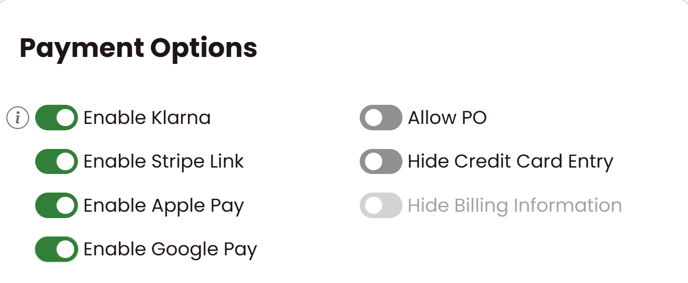
You will be able to toggle the new payment methods of Klarna, Stripe Link, Apple Pay, and Google Pay On or Off at the store level, giving you more flexibility in what you offer your customers. You’ll find this option under your General Settings page, within Payment Options.
Google Pay, Apple Pay, and Stripe link will automatically be turned on for all stores that do not have Credit Card entry hidden.